How to centralise remote access: securing all access to your OT systems

Centralising remote access and reducing tool sprawl creates benefits for engineer and system productivity, reduces risk, and adds control and governance.
Remote access is critical for cyber-physical systems (CPS) in industrial environments. First- and third-party vendors need access to their devices in your network. Sometimes that access is needed at 3 am because a system is offline unexpectedly, or remote access is needed when an engineer is based in another country and needs to perform regular device maintenance.
For many organisations, this need for remote access results in many tools. In fact, according to research, 55% of organisations have four or more remote access tools in their OT environment — and 33% have more than six.
Tool sprawl like this translates to an expanded attack surface, so it’s no coincidence that 82% of organisations have experienced at least one cyber attack related to third-party access. And that’s only breaches from third-party remote access — not including internal engineers remotely accessing critical devices.
Why are there so many tools performing the same function and adding to the attack surface? Often, OEMs, integrators and contractors have their own tool or prefer a specific avenue. If there isn’t a centralised tool available, engineers make do with consumer-grade or IT tools so they’re able to perform necessary actions.
Why tool sprawl is rampant
There are many reasons organisations end up in this position. Broadly, the list of concrete reasons below stems from the original disconnected nature of CPS devices. The assets were deployed in isolation, fully disconnected from other devices or any network. As connectivity was introduced, each vendor and internal team came up with its own way that worked to access these devices remotely.
Both machine builders and industrial automation manufacturers produce assets that work together to make a functional production line in a plant. The assets produced by each vendor type are used in production lines across many plants for all of their customers. You can see the compounding effect at work here — hundreds of assets in an industrial environment need secure remote access by multiple vendor types which each use their own preferred tool and method.
Why an organisation would consolidate tools
There are a number of common drivers for tool consolidation:
- The primary negative drivers are failed audits and security breaches. These are the most common reactive reasons organisations seek this change.
- Some organisations are motivated by other projects. One common cause is a segmentation project, during which remote access solutions are cut off because they’re segmented out or communication with a device is seen to break policies or deviates from accepted behaviours.
- The final motivation is the most proactive. Some organisations are aware of the risks associated with IT or consumer remote access solutions and look for a way out.
Regardless of why you start, you likely have a few objectives, including:
- reducing cost, complexity and risk;
- increasing compliance, mean time to repair (MTTR), connectivity, change management and governance.
The secure access maturity model
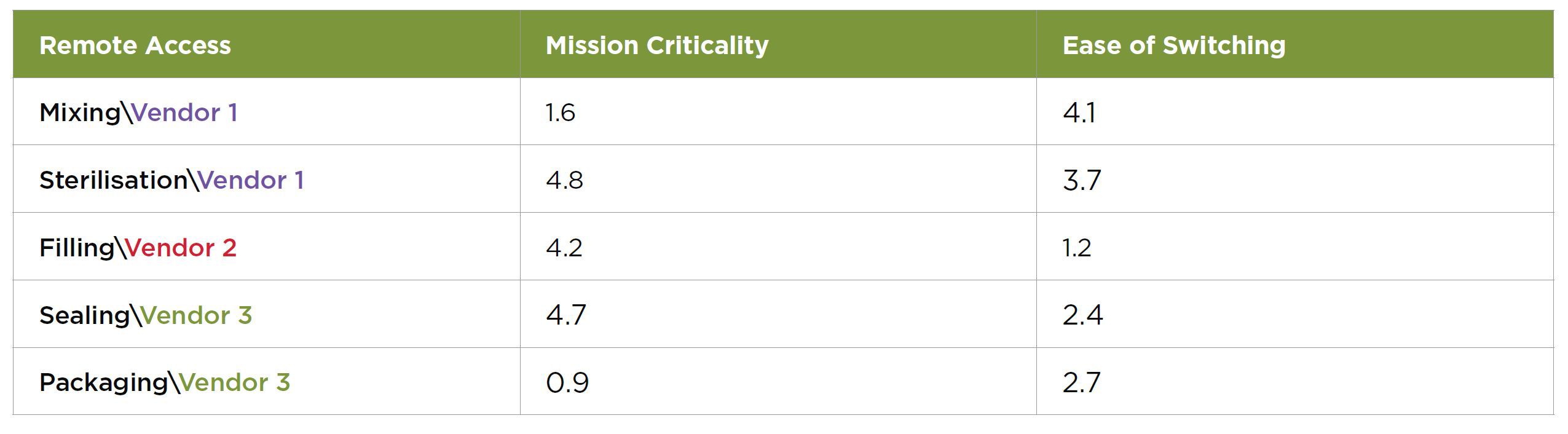
Before initiating a consolidation project, we need to understand the five levels of mature, centralised remote access. You may be at different levels with different vendors depending on contracts, contractors and service level agreements (SLAs).
The five levels are:
- Level 0: Do nothing — Every engineer, internal or third party, connects to your assets however they can. This likely includes external engineers connecting to workstations, and remote workstations tunnelling into OT assets.
- Level 1: First-party access — Internal engineers use a centralised remote access tool. By starting with internal teams, you’re leading by example before introducing a central solution to third parties. Moving your engineers first makes subsequent vendor conversations far smoother, as you can definitively say it works.
- Level 2: Introduction to third parties — Begin with the simplest vendors when bringing external engineers into your established tool. These are likely your third-party engineers connecting to onsite engineering workstations. In the playbook below, we’ll guide how to prioritise vendor types so you know where to start. This is the point at which you are most likely face vendor obstacles and objections.
- Level 3: Advanced third parties — Now it’s time to address more complicated vendors with technically complex architectures, tools and processes. For example, if they’re connecting to your factory via a tunnel from a virtual workstation to a PLC, you move that tunnel into your remote access tool. This is not a perfect solution, but it reduces the attack surface and gives you some control.
-
Level 4: Cost optimisation — The final stage brings all remote access through your centralised tool. Vendor workstations become virtual machines that are brought into the industrial demilitarised zone (IDMZ), providing the same type of remote access as internal engineers.
Note: It is possible to jump from Level 2 to Level 4, depending on the vendor relationships and types of access used today.
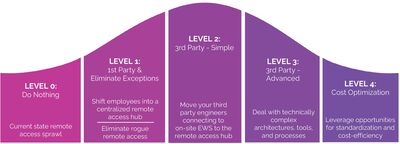
A chasm is often created after Level 2. Internal and select third-party vendors are relatively simple to switch. Beyond those, you will likely encounter challenging conversations and real pushback.
Common vendor engagement obstacles
The following are obstacles often raised by vendors who end up switching to a centralised secure access hub. The root causes shared across these are either a loss of control over a customer account or concern about scalability.
Objection examples are:
- IP Protection: “We can’t have you record what our engineers are doing.”
- Binding Agreements: “Remote Access is built into our contract.”
- SLA and Vendor Responsibility: “This breaks our standard SLAs.”
- Financial: “This is not our model.”
- Operational: “We are not trained on this tool.”
You may anticipate hearing some of these objections, and that may be why you still have multiple remote access tools.
Whether you can already pinpoint which challenge you’ll face with which vendors or you have no idea what’s to come, the playbook below will prepare you for consolidated, secure access.
Playbook: Centralising secure access
This plan includes three primary steps: Discovery, Prioritisation and Engagement.
Step 1: Discovery
Get to know the access tools and technologies that are being used in your sites.
Vendors may use diverse technologies and architectures. Understanding these solutions is key for risk assessments, prioritisation and planning the next steps.
Step 2: Prioritisation
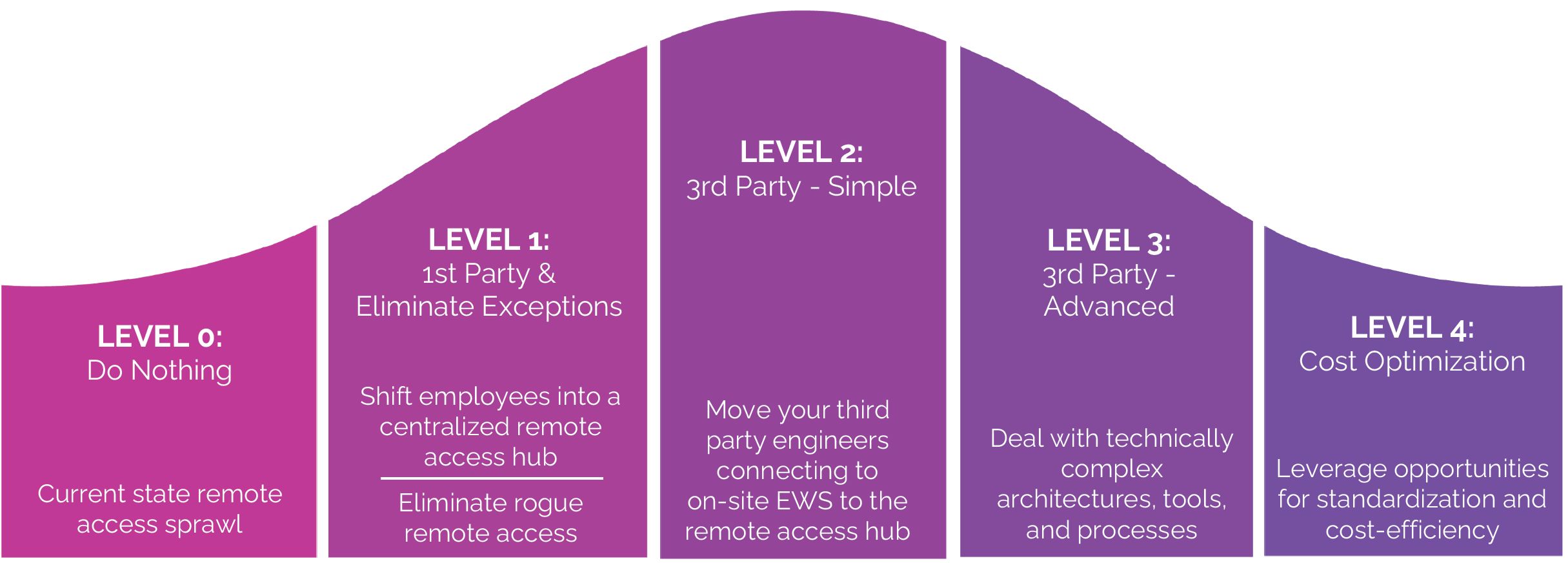
Methodically prioritise the vendors you engage with based on mission criticality and ease of switching.
First, define criticality using concrete criteria. You can use defined asset criticality to assess risks if the device were breached, and define the criticality of remote access for each asset in your CPS protection tool.
Rank vendors and their assets on a scale from 1 (least) to 5 (most) when establishing mission criticality:
- Consequence of incorrect operation: Measures the risk of harm if an asset is accessed improperly (whether accidental or malicious).
- Frequency of remote support needs: Measures how often the asset requires remote diagnostics, updates or troubleshooting.
- Distribution across sites: Measures whether the same asset or system type exists across multiple facilities.
- Regulatory and audit exposure: Measures whether access to this asset is subject to external audit, regulatory control or contractual oversight.
- Variability of user roles: Measures whether multiple types of users (OEMs, internal engineers, contractors) need access to the asset.
-
Sensitivity of mean time to recovery (MTTR): Measures whether delays in diagnosing or resolving issues increase downtime cost or safety risk.
Next, evaluate the ease of switching each vendor to your centralised remote access hub.
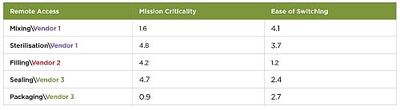
Rank these criteria on a scale from 1 (least) to 5 (most) challenging when establishing ease of switching each vendor:
- Vendor openness to switching: Is the original equipment manufacturer (OEM) willing to consider a change? Factors that might make some more or less willing include whether remote access is embedded in OEM contracts, or if they have no ties to a specific tool.
- Integration complexity: How deeply embedded is the current solution in the OEM’s architecture? Modular architectures are easier to tackle than those with custom remote access integrations.
- Contractual lock-in: Are there penalties for your organisation if you terminate or alter the contract early by removing remote access? Long-term, inflexible contracts are tougher to exit than those with transparent exit terms.
- Field technician enablement: Will the switch require field operational enablement or retraining? If minimal retraining is required due to intuitive UIs, they’re likely more open to the change.
-
Cybersecurity standards: What is the risk associated with implementing the new access tool? Tools that are pre-certified with proven hardening are likely to be perceived as easier to adopt.
Once all vendors and assets requiring access are prioritised, use metrics to evenly compare all vendors (see Table 1). Then plot these scores based on mission criticality versus ease of switching to plan your strategy and next steps (Figure 1).
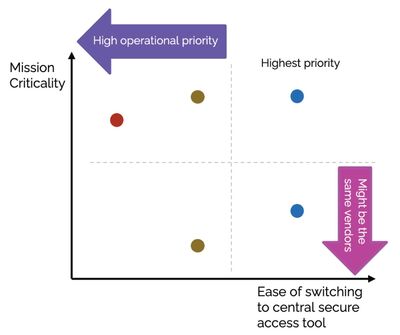
Step 3: Engagement
Adjust your engagement methods to the vendor and the remote access tool. There are five stages to use while progressing through the vendor scores you’ve just completed.
- Establish a standard access policy: Create a company policy for secure access that is backed by up-to-date regulations. This can be used to transition and sway all vendors.
- Begin with the easy targets: Use your priority list to engage with the vendors who are likely to switch without much effort.
- ‘Birds of a feather’: Ask other vendors for support to convince those who are less willing to switch.
- ‘Odd one out’: Once a majority of vendors have been onboarded, use that as leverage with remaining vendors.
- Make a procurement case: Establish that non-compliant access solutions will be excluded in future projects. This is the last step as it is the most extreme option if a vendor is still unwilling to change.
These five phases have been successfully worked through to move myriad vendors into a centralised remote access hub.
Conclusion
Remote access sprawl is not a theoretical issue — it poses real risks for industrial enterprises today. Centralising remote access creates benefits for engineer and system productivity, reduces risk, and adds control and governance.
This can be a daunting project with many complexities, but it can be done and the rewards include increased productivity, reduced risk and reduced complexity. You can make substantial progress fairly quickly by moving first- and easier third-party engineers. Then you can leverage this playbook to tackle the resistant or more complex vendor scenarios.
The next era of generative AI in industry
Exploring developments in generative industrial AI and their implications for industry.
4 common causes of rotating asset failure and how to prevent them
Preventing failure of rotating assets with predictive maintenance using condition-monitoring...
Critical industries need to know how to isolate, rather than ignore
It is time for critical infrastructure organisations to act on ASD's warnings about...